Microsoft MVP성태의 닷넷 이야기
글쓴 사람
정성태 (techsharer at outlook.com)
홈페이지
첨부 파일
 

이벤트 로그 - The Adobe Flash Player Update Service service entered the stopped state.

이벤트 로그의 "SYSTEM" 범주에 다음과 "Adobe Flash Player Update Service" 관련해서 "Started" / "Stopped" 이벤트가 각각 1시간마다 찍힙니다.

Event Type: Information
Event Source:   Service Control Manager
Event Category: None
Event ID:   7036
Date:       2014-11-04
Time:       오전 5:36:00
User:       N/A
Computer:   WIN2003X86
Description:
The Adobe Flash Player Update Service service entered the stopped state.

"SYSTEM" 범주에 이런 식으로 많이 찍어대면 정작 문제가 있는 이벤트 항목을 찾는 것이 번거로워지는데요. 1시간은 좀 그렇고, 하루에 한번 정도만 찍히게 해도 좋을 듯 싶습니다.

이를 위해 Windows Server 2003의 경우 제어판 / "Scheduled Tasks" / "Adobe Flash Player Updater"를, Windows Server 2012의 경우 제어판 / "Administrative Tools" / "Task Scheduler"의 "Task Scheduler Library" 란에 "Adobe Flash Player Updater"를 선택해서 다음과 같이 하루 단위로 바꿔 주시면 됩니다.
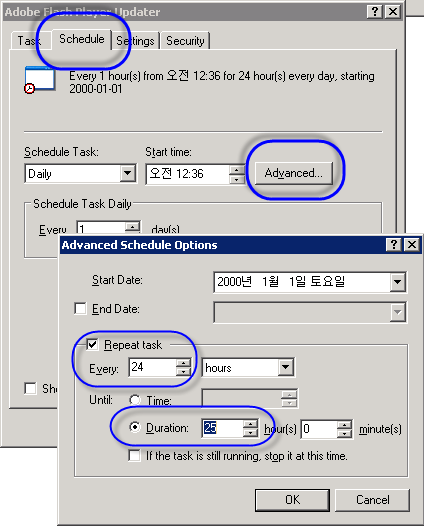
adobe_flash_player_updater_1.png


[이 글에 대해서 여러분들과 의견을 공유하고 싶습니다. 틀리거나 미흡한 부분 또는 의문 사항이 있으시면 언제든 댓글 남겨주십시오.]


[최초 등록일: ]
[최종 수정일: 11/4/2014]

Creative Commons License
이 저작물은 크리에이티브 커먼즈 코리아 저작자표시-비영리-변경금지 2.0 대한민국 라이센스에 따라 이용하실 수 있습니다.
by SeongTae Jeong, mailto:techsharer at outlook.com

비밀번호

댓글 작성자


... 151  152  153  154  [155]  156  157  158  159  160  161  162  163  164  165  ...
NoWriterDateCnt.TitleFile(s)
1292정성태5/24/201228619.NET Framework: 324. First-chance exception에 대해 조건에 따라 디버거가 멈추게 할 수는 없을까? [1]파일 다운로드1
1291정성태5/23/201236496VC++: 62. 배열 초기화를 위한 기계어 코드 확인 [2]
1290정성태5/18/201241031.NET Framework: 323. 관리자 권한이 필요한 작업을 COM+에 대행 [7]파일 다운로드1
1289정성태5/17/201246073.NET Framework: 322. regsvcs.exe로 어셈블리 등록 시 시스템 변경 사항 [5]파일 다운로드2
1288정성태5/17/201231734.NET Framework: 321. regasm.exe로 어셈블리 등록 시 시스템 변경 사항 (3) - Type Library파일 다운로드1
1287정성태5/17/201235091.NET Framework: 320. regasm.exe로 어셈블리 등록 시 시스템 변경 사항 (2) - .NET 4.0 + .NET 2.0 [2]
1286정성태5/17/201243895.NET Framework: 319. regasm.exe로 어셈블리 등록 시 시스템 변경 사항 (1) - .NET 2.0 + x86/x64/AnyCPU [5]
1285정성태5/16/201239241.NET Framework: 318. gacutil.exe로 어셈블리 등록 시 시스템 변경 사항파일 다운로드1
1284정성태5/15/201231241오류 유형: 155. Windows Phone 연결 상태에서 DRIVER POWER STATE FAILURE 블루 스크린 뜨는 현상
1283정성태5/12/201238792.NET Framework: 317. C# 관점에서의 Observer 패턴 구현 [1]파일 다운로드1
1282정성태5/12/201231897Phone: 6. Windows Phone 7 Silverlight에서 Google Map 사용하는 방법 [3]파일 다운로드1
1281정성태5/9/201239042.NET Framework: 316. WPF/Silverlight의 그래픽 단위와 Anti-aliasing 처리를 이해하자 [1]파일 다운로드1
1280정성태5/9/201231856오류 유형: 154. Could not load type 'System.ServiceModel.Activation.HttpModule' from assembly 'System.ServiceModel, ...'.
1279정성태5/9/201231521.NET Framework: 315. 해당 DLL이 Managed인지 / Unmanaged인지 확인하는 방법 [1]파일 다운로드1
1278정성태5/8/201232862오류 유형: 153. Visual Studio 디버깅 - Unable to break execution. This process is not currently executing the type of code that you selected to debug.
1277정성태5/8/201236884오류 유형: 152. cmd.exe - The system cannot write to the specified device. [2]
1276정성태4/28/201229080Phone: 5. 모든 Marketplace에 윈폰 앱을 등록하는 방법 [1]
1275정성태4/28/201232115개발 환경 구성: 150. 프로세스 실행으로 잠긴 파일이지만, 이름은 변경가능하다는 사실! 아셨나요? [7]
1274정성태4/17/201227167Phone: 4. "Holiday Calendar" 윈폰 응용 프로그램 등록
1273정성태4/6/201231069Phone: 3. 윈도우 폰을 위한 Holiyday Calendar 앱 개발파일 다운로드1
1272정성태4/5/201231995오류 유형: 151. ASP.NET - EcbGetUnicodeServerVariables 코드에서 System.AccessViolationException 예외 발생
1271정성태4/3/201233365Math: 6. 동전을 여러 더미로 나누는 경우의 수 세기 [1]
1270정성태3/29/201228719오류 유형: 150. Visual Studio 2010 원격 디버깅 오류 - Kerberos authentication failed
1269정성태3/27/201242975오류 유형: 149. ODP.NET 오류 - The provider is not compatible with the version of Oracle client
1268정성태3/27/201239029오류 유형: 148. WCF svc 호출 시 HTTP Error 404.17 - Not Found [1]
1267정성태3/16/201237789.NET Framework: 314. C++의 inline asm 사용을 .NET으로 포팅하는 방법 [1]파일 다운로드1
... 151  152  153  154  [155]  156  157  158  159  160  161  162  163  164  165  ...